


Introduction #
Before jumping directly to the topic, this article gives an introduction to the world of digital identities.
If you are already familiar with these concepts, feel free to jump directly to: Using OIDC to Authenticate GitHub Actions.
It has been more than six decades since the first computer password appeared, as a solution to protect the resources of a time-sharing computer at MIT from abuse. From this point on, passwords have evolved, became more secure, and even became obsolete (in their traditional form) since Passkeys are becoming increasingly popular. Throughout this evolution, there was a clear goal: make passwords more secure (=more difficult to steal, reverse engineer, and guess).
In one way, one can argue that passwords are a small part of their owners’ identity, as they are used as an identification mean towards different digital systems. Most people associate passwords with humans i.e., as an individual, I have my personal password to access e.g. GitHub.com. However, humans are not the only entities having/using passwords in today’s digital landscape.
Over the time, computer systems required (as well) to have their own identities. These identities are used to gain access to other systems and resources that need to be access-protected.
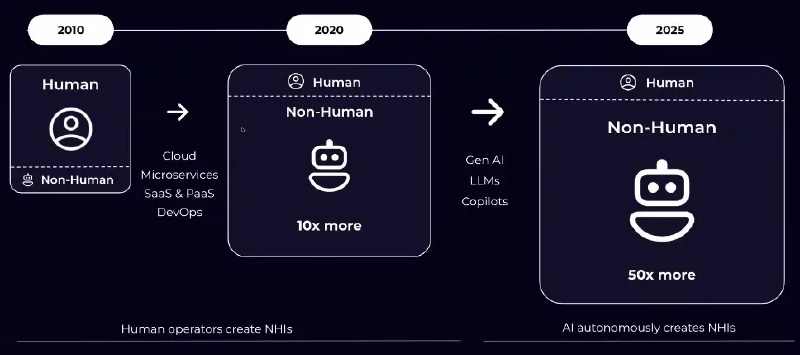
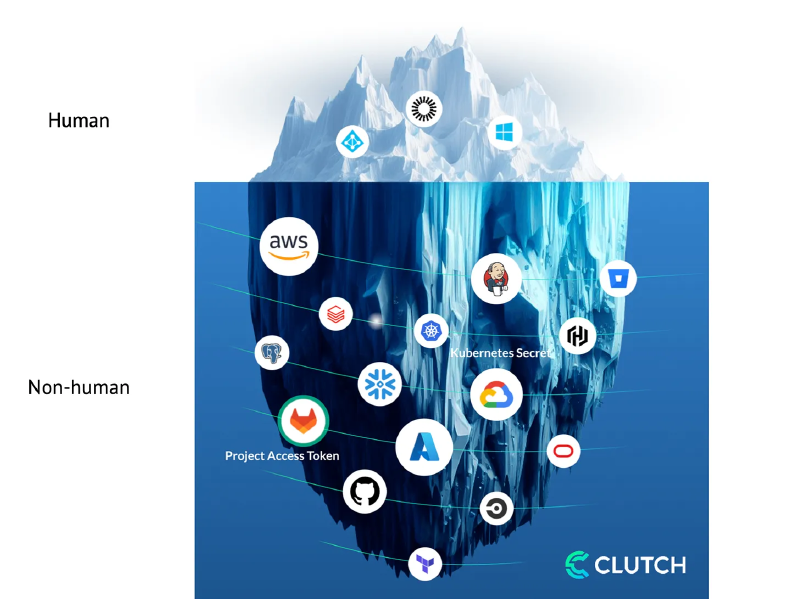
Today, non-human identities (for computer systems) have surpassed human identities, creating a fertile ground for attacks, identity theft, and impersonation.
Non-Human Identities #
Non-human identities are increasingly used by all types of systems and automation – from your CI/CD system (clones source code, publishes build artifacts), to monitoring systems (e.g. monitoring/querying services using API tokens), and your Terraform scripts, when deploying and configuring infrastructure.
Like with human passwords, the landscape is quite diverse around the security and form of such identities. In the past, such systems used static ‘service-accounts’ (typically a username-password combination, but not for a human), which were quite easy to leak and quite difficult to scope. Later on, fine-grained API tokens emerged, slightly improving the security posture. A common pitfall of these identities is their (relatively) static nature – once they leak and until they are (manually) revoked/rotated, they can be used by attackers to gain unwanted access to systems.
Due to the severe consequences of a potential leak, the industry has moved on to modern Zero Trust based authentication. In this paradigm, identities are rotating, issued on-demand, and evaluated continuously. In addition, the trust ‘mindset’ is changed, from “trusting the password” to “trusting the identity issuer.”
Identity Providers (IdP) #
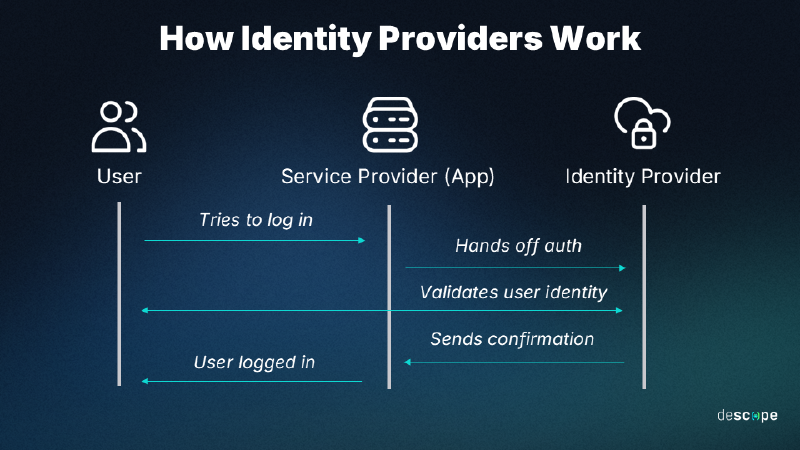
To achieve this, Identity Providers (IdP) issue identities to entities known to them. In this regard, IdPs vouch for the authenticity of entities known to them. To explain this better, I will use an example:
When needed to identify myself (e.g. at an airport), I am using a state-issued and worldwide accepted identity, such as my passport. This is accepted for two main reasons:
- it is issued by a trusted authority (in this case, the Hellenic Police)
- it adheres to a worldwide accepted standard (PRADO - Public Register of Authentic identity and travel Documents Online/GRC-AO-04001).
Another example from the digital world:
When I want to login to e.g. Tailscale, I can do that by using my GitHub.com account. In this case, GitHub.com is considered to be a trusted authority that “vouches” for my identity. Therefore, Tailscale trusts GitHub.com sufficiently, to accept identities of entities recognized by GitHub. This paradigm is widely known as Single-Sign On (SSO).
Three protocols standardize this communication:
- SAML
- OAuth2
- OIDC
Open-ID Connect (OIDC) #
OIDC in particular has become the de facto standard, and is worth understanding in more depth:
OpenID Connect or OIDC is an identity protocol that utilizes the authorization and authentication mechanisms of OAuth 2.0. The OIDC final specification was published on February 26, 2014, and is now widely adopted by many identity providers on the Internet.
OIDC was developed by the OpenID Foundation, which includes companies like Google and Microsoft. While OAuth 2.0 is an authorization protocol, OIDC is an identity authentication protocol and may be used to verify the identity of a user to a client service, also called Relying Party. In addition, users’ claims like, for example, name, email address, etc., may also be shared on request.
A wide variety of clients may use OpenID Connect (OIDC) to identify users, from single-page applications (SPA) to native and mobile apps. It may also be used for Single Sign-On (SSO) across applications. OIDC uses JSON Web Tokens (JWT), HTTP flows and avoids sharing user credentials with services.
Read more at: What is OpenID Connect (OIDC) | auth0
Using OIDC to Authenticate GitHub Actions #
GitHub Actions often need to integrate with external systems — to fetch secrets, query APIs, or push artifacts. Pipelines can authenticate using any mechanism supported by the target system (e.g. static service-accounts, API tokens, etc).
Since GitHub can act as an Identity Provider, you can also authenticate your pipelines using short-lived, rotating identities issued by the GitHub Platform.
Every time your job runs, GitHub’s OIDC provider auto-generates an OIDC token. This token contains multiple claims to establish a security-hardened and verifiable identity about the specific workflow that is trying to authenticate.
GitHub’s OIDC tokens are short-lived (typically minutes) which significantly reduces the blast radius of a potential leak.
In this example, I will consider pipelines running on GitHub Enterprise Server (GHES), but the same applies for running on GitHub.com.
Understanding GitHub OIDC JWT Tokens #
Each job requests an OIDC token from GitHub’s OIDC provider, which responds with an automatically generated JSON web token (JWT) that is unique for each workflow job where it is generated. When the job runs, the OIDC token is presented to the cloud provider. To validate the token, the cloud provider checks if the OIDC token’s subject and other claims are a match for the conditions that were preconfigured on the cloud role’s OIDC trust definition.
The following example OIDC token uses a subject (sub) that references a job environment named prod in the octo-org/octo-repo repository.
{
  "typ": "JWT",
  "alg": "RS256",
  "x5t": "example-thumbprint",
  "kid": "example-key-id"
}
{
  "jti": "example-id",
  "sub": "repo:octo-org/octo-repo:environment:prod",
  "environment": "prod",
  "aud": "https://github.com/octo-org",
  "ref": "refs/heads/main",
  "sha": "example-sha",
  "repository": "octo-org/octo-repo",
  "repository_owner": "octo-org",
  "actor_id": "12",
  "repository_visibility": "private",
  "repository_id": "74",
  "repository_owner_id": "65",
  "run_id": "example-run-id",
  "run_number": "10",
  "run_attempt": "2",
  "runner_environment": "github-hosted",
  "actor": "octocat",
  "workflow": "example-workflow",
  "head_ref": "",
  "base_ref": "",
  "event_name": "workflow_dispatch",
  "ref_type": "branch",
  "job_workflow_ref": "octo-org/octo-automation/.github/workflows/oidc.yml@refs/heads/main",
  "iss": "https://token.actions.githubusercontent.com",
  "nbf": 1632492967,
  "exp": 1632493867,
  "iat": 1632493567
}
This JSON structure has several fields, which are called claims. Each claim provides specific information about the workflow (e.g. workflow, repository_id) and they can be used separately or in combinations, as part of your validation logic.
For instance, assume you would like to grant access to an internal API only to a specific workflow and only if it runs from a specific repository. In the validation logic, you can assess the values of the corresponding claims.
GitHub provides a detailed explanation about these claims: OpenID Connect Reference | GitHub.com.
Although most of these fields are pre-set by GitHub, each workflow can modify the aud field, where custom information can be provided.
The aud (audience) claim is used to scope a token to a specific intended recipient. This matters because it prevents a token issued for one service from being used — accidentally or maliciously — to authenticate against a different service.
Each (target) service then validates that the aud claim in the token matches what it expects — and rejects anything that doesn’t. It’s a simple but effective guard against token misuse across services.
Workflow permissions #
To obtain OIDC tokens from your actions, you need to set the appropriate permissions:
permissions:
  id-token: write # This is always needed to be able to request a JWT token
Moreover, if you want to obtain such a token on a workflow level, you need additionally:
contents: read Why is contents: read needed?
When you explicitly define a permissions block in GitHub Actions, you’re telling GitHub to use only the permissions you’ve listed — everything else defaults to none. This is actually good security practice (least privilege), but it means you need to be explicit about everything your workflow needs.
At the job level, contents: read is already implied by default, so you don’t need to declare it. But at the workflow level, adding id-token: write alone will silently strip away the default read access to your repository contents — meaning actions/checkout will fail. Adding contents: read alongside it restores that access explicitly.
So the pairing you’ll commonly see:
permissions:
  id-token: write   # needed to request the JWT token
  contents: read    # needed to allow actions/checkout to work
Obtaining OIDC tokens via scripts #
After setting the permissions, to obtain a JWT token you can call getIDToken() in your actions. If you would like to use a custom audience, then use getIDToken(audience)
This calls an npm function and you can read more about it in the official documentation.
Obtaining OIDC tokens via environment variables #
Another method of obtaining JWT tokens from GitHub’s OIDC provider, is by the following cURL request:
curl -H "Authorization: bearer $ACTIONS_ID_TOKEN_REQUEST_TOKEN" "$ACTIONS_ID_TOKEN_REQUEST_URL&audience=<custom_audience_field>"Where is GitHub OIDC commonly used? #
GitHub OIDC is widely used to authenticate workflows to external systems such as:
- Cloud platforms (AWS, Azure, GCP)
- Artifact repositories
- Internal APIs
- Secret management systems (e.g., Vault)
Instead of storing long-lived credentials in GitHub secrets, these systems trust GitHub’s identity provider and grant temporary access based on the workflow’s identity.
Conclusion #
Closing, the following table gives a summary of “Traditional secrets vs. OIDC”:
| Traditional Secrets | OIDC |
|---|---|
| Long-lived | Short-lived |
| Stored in GitHub Secrets | Issued dynamically |
| Must rotate manually | Auto-rotated |
| Can leak in logs | Harder to misuse |
By using OIDC as an identification mechanism, we enjoy rotating identities (tokens) of high-security standards, as long as we trust the Identity Provider (GitHub). This approach is fully aligned with modern Zero Trust principles and allows us to move away from legacy static ‘service-accounts’.
In the next article we will implement a real-world example and protect an internal API using GitHub OIDC tokens. We will validate JWT claims such as the repository, workflow, and branch to control which pipelines are allowed to access the service. Stay tuned and let me know in the comments if you are already using OIDC, or thinking of switching to it as a form of digital identity.