


Introduction #
This article builds on concepts introduced in part 1. If you need a refresher on digital identities and OIDC, start there.
The previous post in the series explained the benefits of modern authentication protocols (e.g. OIDC) and how they implement Zero Trust principles. Additionally, it explained how OIDC can be used in GitHub Actions to improve security posture.
This post explains how to protect web endpoints (APIs, services) from unauthenticated and unauthorized access, while both authentication and authorization will happen via OIDC.
Before diving into the implementation, let’s briefly cover:
- Authentication, authorization, and identity providers
- High-level architecture of the solution we will implement later on
Authentication, authorization, and identity providers #
Let’s use again an example from the aviation world: Imagine someone wanting to fly to a country with visa entrance requirements. At the departure airport, two checks happen before they can board:
- The eGate verifies their passport is genuine and belongs to them — this is authentication (you are who you claim to be)
- The gate agent checks their visa before allowing them to board — this is authorization (you are permitted to enter the destination country)
In the case of accessing protected resources via GitHub Actions, you start by sending/presenting an OIDC token to the protected endpoint. Then:
- The validity of your actions’ token is checked – this is the authentication (authN) part
- If the token is valid, your token’s claims are checked to determine if you are authorized to access the resource – this is the authorization (authZ) part
This is nicely illustrated in the following picture:
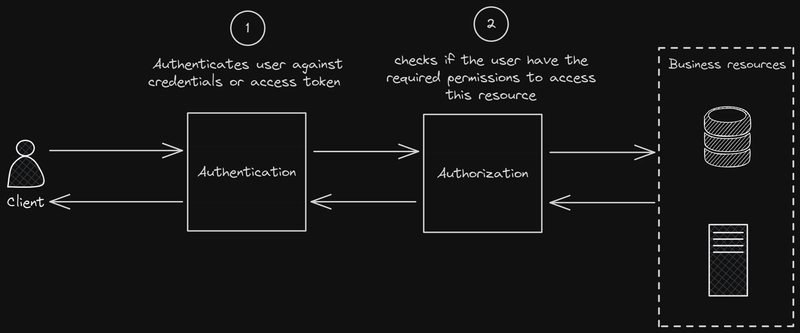
Conceptually straightforward, but implementation details can become complex depending on policy requirements. For instance: workflow “X”, run from repository “Y” wants to access resource “Z.” Is this allowed?
The authentication part is more interesting, as this involves setting up the trust between an Identity Provider (IdP) and a protected service, as well as using the established trust as a validation mechanism.
GitHub OIDC JWT revisited #
The previous post in the series explained the anatomy of JWTs obtained by GitHub’s OIDC provider. It is equally important to understand what these tokens look like as a whole (together with their signing info), as this will be key in understanding how validation happens in the authentication (authN) step.
In its compact form, JSON Web Tokens consist of three parts separated by dots (.), encoded in
Base64URLwhich are:
- Header
- Payload
- Signature
Therefore, a JWT typically has the following form: xxxxx.yyyyy.zzzzz
You can read more about the significance of each individual part at: JSON Web Token Introduction
Once a JWT is sent to a service, it will be validated and verified:
- Validated: The token’s structure, encoding, and specific claims (e.g. expiration time) will be checked.
- Verified: The signature part of the JWT is checked against the header and payload. This is done using the algorithm specified in the header (like
HMAC,RSA, orECDSA) with a secret key or public key. If the signature doesn’t match what’s expected, the token might have been tampered with or is not from a trusted source. Additionally, theissclaim is checked to match an expected issuer and theaudclaim to match the expected audience.
High-level architecture of the suggested OIDC-based security mechanism #
At a high level, the workflow obtains a short-lived OIDC token from GitHub, sends it to Envoy, which validates the token using GitHub’s public keys, evaluates authorization rules based on claims, and forwards the request to NGINX only if all checks pass.
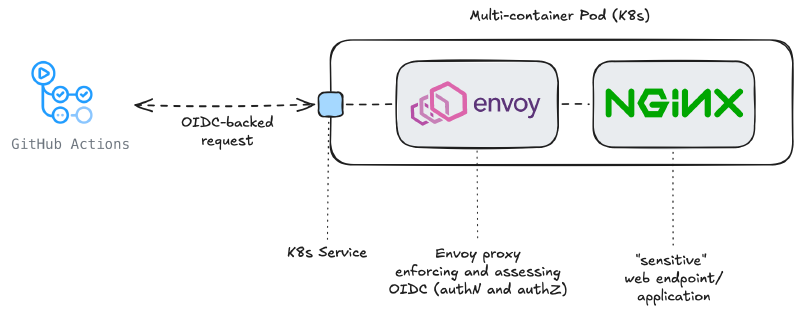
Let’s walk through the elements of this solution:
- GitHub Actions: these are the actions that need access to a ‘sensitive/protected’ endpoint. They will identify themselves using a JWT obtained by GitHub’s OIDC service.
- Sensitive Web Server: NGINX is the webserver providing the sensitive endpoint. While NGINX can be extended to support OIDC (e.g. via external auth or additional components), in this example we will consider this to be a ’legacy’ web application, one you can not modify/modernize to understand OIDC.
- Guarding proxy: Envoy’s duty is to guard the sensitive endpoint, offered by NGINX. Therefore, Envoy will be handling both authN and authZ, allowing/blocking requests towards NGINX.
Envoy is just one of the proxies we could have selected for this task. There are many other proxies supporting OIDC (e.g. oauth2-proxy), however I opted for a proxy being able to handle both authN and authZ. Other proxies (e.g. oauth2-proxy) can handle authN, but ‘delegate’ authZ to an ’external’/different system. This could work, but I preferred to show the complete solution using as few parts as possible.
Less is more!
This setup will be replicated in Kubernetes using a Deployment. This will result in the creation of a multi-container Pod. This is also known as a sidecar pattern and this approach is chosen because:
- Containers deployed in a Pod can be made inaccessible from containers in other Pods of the cluster, which is exactly what we need for NGINX.
- Container resources can be made available (selectively) to other Pods of the cluster, by using e.g. Kubernetes Services.
- Envoy and NGINX talk to each other via
localhost. NGINX must only listen on127.0.0.1and only Envoy’s services are exposed to the rest of the cluster, via a Kubernetes Service.
Threat Model #
This solution protects against:
- Unauthorized access to internal services from external or rogue workloads
- Credential leakage (no static secrets)
- Token replay across services (via audience restriction)
It does NOT protect against:
- Compromised GitHub runners and/or GitHub Actions permissions
- Malicious code within allowed repositories
- Network bypasses
Implementation of the solution #
At a high level, the workflow:
- Requests an OIDC token from GitHub
- Sends it to Envoy with the request
- Envoy validates the token using JWKS
- Envoy evaluates authorization rules
- Only then forwards traffic to NGINX
The following sections break down how each component implements this flow.
Deployment #
This deployment is quite straightforward – it contains the instantiation of the two containers (envoy, NGINX), as well as some basic configuration:
apiVersion: apps/v1
kind: Deployment
metadata:
  name: secured-nginx
  namespace: oidc-experiments
spec:
  replicas: 1
  selector:
    matchLabels:
      app: secured-nginx
  template:
    metadata:
      labels:
        app: secured-nginx
    spec:
      containers:
      - name: nginx
        image: nginx:latest
        ports:
        - containerPort: 80
        volumeMounts:
        - mountPath: /etc/nginx/conf.d/default.conf
          name: nginx-config
          subPath: default.conf

      - name: envoy
        image: envoyproxy/envoy:v1.33-latest
        ports:
        - containerPort: 8080
        - containerPort: 9901 # Admin port, for testing and debugging. Do not use in production.
        env:
        - name: ENVOY_LOG_LEVEL
          value: "debug"
        volumeMounts:
        - name: envoy-config
          mountPath: /etc/envoy

      volumes:
      - name: envoy-config
        configMap:
          name: envoy-config
      - name: nginx-config
        configMap:
          name: nginx-config
This deployment alone is only one part of the solution. Equally important are the configurations of NGINX and Envoy, which tailor the solution to our needs. Let’s check them in detail.
NGINX’s configuration #
The NGINX configuration is intentionally restrictive. By setting listen 127.0.0.1:80, we ensure the service binds only to the loopback interface. In a Kubernetes environment, containers within the same Pod share the localhost network namespace. This configuration helps to create a secure pipe, ensuring that NGINX is only reachable by the Envoy sidecar after validating JWT claims.
If we bound to 0.0.0.0, the NGINX service would be exposed on the Pod’s IP address, potentially allowing traffic to bypass our Envoy security filters entirely. The rest of the configuration simply defines a basic text response for the root route.
apiVersion: v1
kind: ConfigMap
metadata:
  name: nginx-config
  namespace: oidc-experiments
data:
  default.conf: |
    server {
        listen 127.0.0.1:80;
        server_name localhost;

        location / {
            add_header Content-Type text/plain;
            return 200 'Welcome to the Protected NGINX Sidecar!\n';
        }
    }
Envoy’s configuration #
We need to configure Envoy such that it operates like an authentication and authorization gateway sitting in front of the ‘protected’ NGINX backend. Requests must carry a valid GitHub (Enterprise) OIDC JWT and originate from a specific repository before they ever reach the protected service.
This configuration consists of the following elements:
The listener #
Envoy binds on port 8080 and processes all incoming HTTP traffic through an HttpConnectionManager — the standard entry point for HTTP-level filtering in Envoy. All traffic is routed upstream to a local NGINX instance on port 80.
The filter chain #
This is the heart of the config. Filters execute in order, and a request must pass all of them to reach the backend.
1. jwt_authn — Token validation/Authentication
The first filter validates the incoming JWT cryptographically (authN). It:
- Accepts tokens issued by a GitHub (Enterprise) instance (
/_services/token) - Fetches the public signing keys dynamically from the JWKS endpoint, caching them for 5 minutes — so Envoy doesn’t call GitHub on every request
- Enforces that the token’s aud claim matches
protected-nginx— this is configurable and a token minted for a different audience is rejected outright - Forwards the validated token downstream and places the decoded payload into dynamic metadata under the key
jwt_payload— making it available to subsequent filters
At this point Envoy has proven the token is genuine and hasn’t expired. It hasn’t yet made any authorization decisions.
2. lua — Repository authorization
This is where authZ happens. A Lua filter is defined that reads the jwt_payload from dynamic metadata (passed by the previous filter) and enforces a repository allowlist.
A few things worth noting:
- It accesses the payload metadata via
streamInfo():dynamicMetadata():get("envoy.filters.http.jwt_authn"), which are forwarded by the previous (http.jwt_authn) filter (hence the namespace used) - It checks the
repositoryclaim, which GitHub (Enterprise) Server includes in OIDC tokens issued from Actions workflows - If the
repositoryisn’t in the allowlist, it short-circuits with a403— the request never reaches NGINX - Calling
request_handle:respond()from within the request path terminates processing immediately; no explicit return after a non-allowlisted repo is technically needed, but it’s good defensive practice
For more on what you can do in Lua filters, see the Envoy Lua filter docs.
Beware: Repository names are not immutable! If you delete a repository and a malicious user later creates one with the exact same name (after the name becomes available), your validation logic won’t be able to distinguish the new “recycled” repo from your original one. To eliminate this risk, validate the repository_id – a unique, immutable number that is never reused.
3. router
The terminal filter — forwards authorized requests to the nginx_service cluster. Every HttpConnectionManager filter chain must end with this.
The clusters #
Two upstream clusters are defined:
nginx_service— a static cluster pointing to127.0.0.1:80. Envoy and NGINX are co-located (as sidecars in the same pod), so no DNS resolution is needed.github_ent_jwks— aLOGICAL_DNScluster used exclusively to fetch the JWKS keys for JWT validation. It uses TLS (UpstreamTlsContext) to talk to the GitHub (Enterprise) host. TheLOGICAL_DNStype is appropriate here: Envoy resolves the hostname once and re-resolves periodically, which works well for an external service where you want DNS-based failover without fullSTRICT_DNSchurn. See cluster types for the distinctions.
Here is the complete Envoy configuration, defined as a ConfigMap:
  1apiVersion: v1
  2kind: ConfigMap
  3metadata:
  4  name: envoy-config
  5  namespace: oidc-experiments
  6data:
  7  envoy.yaml: |
  8    static_resources:
  9      listeners:
 10      - name: listener_0
 11        address:
 12          socket_address: { address: 0.0.0.0, port_value: 8080 }
 13        filter_chains:
 14        - filters:
 15            - name: envoy.filters.network.http_connection_manager
 16              typed_config:
 17                "@type": type.googleapis.com/envoy.extensions.filters.network.http_connection_manager.v3.HttpConnectionManager
 18                stat_prefix: ingress_http
 19                codec_type: AUTO
 20                route_config:
 21                  name: local_route
 22                  virtual_hosts:
 23                  - name: local_service
 24                    domains: ["*"]
 25                    routes:
 26                    - match: { prefix: "/" }
 27                      route: { cluster: nginx_service }
 28                http_filters:
 29                  - name: envoy.filters.http.jwt_authn
 30                    typed_config:
 31                      "@type": type.googleapis.com/envoy.extensions.filters.http.jwt_authn.v3.JwtAuthentication
 32                      providers:
 33                        github_enterprise:
 34                          issuer: "https://<your_github_endpoint>/_services/token"
 35                          remote_jwks:
 36                            http_uri:
 37                              uri: "https://<your_github_endpoint>/_services/token/.well-known/jwks"
 38                              cluster: github_ent_jwks
 39                              timeout: 5s
 40                            cache_duration:
 41                              seconds: 300
 42                          forward: true
 43                          payload_in_metadata: "jwt_payload"
 44                          audiences:
 45                            - "protected-nginx"
 46                      rules:
 47                      - match:
 48                          prefix: "/"
 49                        requires:
 50                          provider_name: "github_enterprise"
 51                  - name: envoy.filters.http.lua
 52                    typed_config:
 53                      "@type": type.googleapis.com/envoy.extensions.filters.http.lua.v3.Lua
 54                      default_source_code:
 55                        inline_string: |
 56                          function envoy_on_request(request_handle)
 57                            -- Access JWT payload from dynamic metadata
 58                            local dynamic_metadata = request_handle:streamInfo():dynamicMetadata()
 59                            local jwt_metadata = dynamic_metadata:get("envoy.filters.http.jwt_authn")
 60
 61                            if not jwt_metadata or not jwt_metadata["jwt_payload"] then
 62                              request_handle:respond(
 63                                {[":status"] = "401"},
 64                                "JWT validation failed: missing payload"
 65                              )
 66                              return
 67                            end
 68
 69                            local jwt_payload = jwt_metadata["jwt_payload"]
 70
 71                            -- Extract repository from JWT
 72                            local repository = nil
 73
 74                            if jwt_payload["repository"] then
 75                              repository = jwt_payload["repository"]
 76                            end
 77
 78                            if not repository then
 79                              request_handle:logInfo("Repository claim: " .. tostring(repository))
 80                              request_handle:respond(
 81                                {[":status"] = "400"},
 82                                "Missing repository claim in JWT payload"
 83                              )
 84                              return
 85                            end
 86
 87                            -- Check against allowed repositories
 88                            local allowed_repos = {
 89                              "<github_org>/<repository_name>"
 90                            }
 91
 92                            local is_allowed = false
 93                            for _, repo in ipairs(allowed_repos) do
 94                              if repository == repo then
 95                                is_allowed = true
 96                                break
 97                              end
 98                            end
 99
100                            if not is_allowed then
101                              request_handle:respond(
102                                {[":status"] = "403"},
103                                "Repository not authorized: " .. repository
104                              )
105                            end
106
107                            -- If we get here, the request is authorized and continues to NGINX
108                          end
109                  - name: envoy.filters.http.router
110                    typed_config:
111                      "@type": type.googleapis.com/envoy.extensions.filters.http.router.v3.Router
112      clusters:
113      - name: nginx_service
114        connect_timeout: 0.25s
115        type: STATIC
116        lb_policy: ROUND_ROBIN
117        load_assignment:
118          cluster_name: nginx_service
119          endpoints:
120          - lb_endpoints:
121            - endpoint:
122                address:
123                  socket_address:
124                    address: 127.0.0.1
125                    port_value: 80
126
127      - name: github_ent_jwks
128        connect_timeout: 5s
129        type: LOGICAL_DNS
130        dns_lookup_family: V4_ONLY
131        load_assignment:
132          cluster_name: github_ent_jwks
133          endpoints:
134          - lb_endpoints:
135            - endpoint:
136                address:
137                  socket_address:
138                    address: <github_endpoint>
139                    port_value: 443
140        transport_socket:
141          name: envoy.transport_sockets.tls
142          typed_config:
143            "@type": type.googleapis.com/envoy.extensions.transport_sockets.tls.v3.UpstreamTlsContext
144
145    admin:
146      access_log_path: /dev/stdout
147      address:
148        socket_address:
149          address: 0.0.0.0
150          port_value: 9901
This configuration is dense - refer to Envoy’s official documentation for more detailed explanations of the concepts used previously.
Do not forget to change the highlighted lines with the appropriate values for your environment!
How JWT Validation Works #
sequenceDiagram
    autonumber
    participant Workflow as GitHub Actions Workflow
    participant Envoy
    participant IdP as GitHub OIDC Provider (JWKS)

    Workflow->>Envoy: HTTP request + JWT (Authorization header)

    Note over Envoy: Extract JWT (header.payload.signature)

    Envoy->>IdP: Fetch JWKS (public keys) [cached]
    IdP-->>Envoy: JSON Web Key Set

    Note over Envoy: Select key based on `kid` in JWT header

    Envoy->>Envoy: Verify signature using public key
    Envoy->>Envoy: Validate claims (iss, aud, exp)

    alt Token valid
        Envoy->>NGINX: Forward request
    else Token malformed
        Envoy-->>Workflow: 401 Unauthorized
    else Token invalid
        Envoy-->>Workflow: 403 Forbidden
    end
A few key observations from this flow:
- No shared secrets are required — Envoy verifies the token using GitHub’s public keys
- The
kid(Key ID) in the JWT header tells Envoy which key to use from the JWKS - JWKS responses are cached, so Envoy does not contact GitHub for every request
- Validation happens locally and efficiently, enabling high-performance authentication
This is what makes OIDC powerful for machine-to-machine authentication: trust is established cryptographically, not through pre-shared credentials.
Kubernetes Service #
Finally, Envoy’s ’listening’ interface will be made accessible to the rest of the cluster by the means of a Kubernetes Service:
Do NOT expose the admin port (9901) via a Service in any environment beyond local testing.
apiVersion: v1
kind: Service
metadata:
  name: secured-nginx-service # Service FQDN endpoint: secured-nginx-service.oidc-experiments.svc.cluster.local
  namespace: oidc-experiments
spec:
  selector:
    app: secured-nginx
  ports:
  - name: http
    port: 80
    targetPort: 8080  # This is the Envoy listener port
  - name: admin
    # This is useful for debugging (admin interface), but dangerous for production and staging environments
    port: 9901
    targetPort: 9901  # This is the Envoy admin port
  type: ClusterIP
GitHub Actions #
Once your deployment is successful, you can try out the final result by running a GitHub Action like the following:
For this example, it is assumed that your GitHub Actions run on the same cluster as to where your Kubernetes ‘protected’ deployment resides. If this is the case, you can easily resolve your Kubernetes Service local endpoint, as this is resolved by the cluster’s DNS. If your actions run on a different cluster/virtual machine, you either need e.g. an Ingress or a LoadBalancer (instead of a Kubernetes Service), with the appropriate defenses (e.g. mTLS or Network Policies). These objects will get an IP, which is resolvable outside the cluster.
name: GitHub OIDC Tester

on:
    workflow_dispatch:

permissions:
  id-token: write
  contents: read

# Official GitHub documentation on configuring OIDC tokens for GitHub Enterprise Server:
# https://docs.github.com/en/[email protected]/actions/how-tos/security-for-github-actions/security-hardening-your-deployments/configuring-openid-connect-in-cloud-providers

# NOTE: OIDC tokens should be requested just before they are used, as they are short-lived.

jobs:
  access-protected-service:
    runs-on: kubernetes
    steps:
      - name: Get OIDC token with correct audience
        id: get-token-correct
        uses: actions/github-script@v6
        with:
          script: |
            const token = await core.getIDToken("protected-nginx");
            core.setOutput('token', token);

      - name: Access protected NGINX # this should succeed, since the audience is correct
        run: |
          curl -v -H "Authorization: Bearer ${{ steps.get-token-correct.outputs.token }}" \
               http://secured-nginx-service.oidc-experiments.svc.cluster.local/

      - name: Get OIDC token with incorrect audience
        id: get-token-incorrect
        uses: actions/github-script@v6
        with:
          script: |
            const token = await core.getIDToken("foobar");
            core.setOutput('token', token);

      - name: Access protected NGINX # this should fail, since the audience is incorrect
        run: |
          curl -v -H "Authorization: Bearer ${{ steps.get-token-incorrect.outputs.token }}" \
http://secured-nginx-service.oidc-experiments.svc.cluster.local/- The
audclaim binds the token to a specific service, preventing reuse across different targets. Even if a token is valid, it will be rejected if it was not minted for the expected audience. - If you forget to specify
core.getIDToken("audience"), GitHub provides a default audience (usually the repository URL), which will cause Envoy to reject the token if it’s expecting a specific string likeprotected-nginx.
Conclusion, complete solution, and thoughts before moving to production #
This post introduces the full authentication flow for GitHub Actions towards a protected service, using OIDC:
sequenceDiagram
    autonumber
    Workflow-->>IdP: Requests OIDC token (JWT)
    IdP-->>Workflow: Issues JWT (OIDC token)
    Workflow-->>Envoy: HTTP request with JWT in Authorization header
    Envoy-->>IdP: Fetches or refreshes public keys (cached) for JWT validation
    Envoy-->>NGINX: Forwards request (if JWT is valid and authorized)
    NGINX-->>Envoy: Response
    Envoy-->>Workflow: Response
You can find the complete solution at the following GitHub repository:
Although this post has been written with GitHub Enterprise Server (GHES) in mind, the same principles apply to GitHub.com. Additionally, the same concepts apply even if you would like to use any other Identity Provider.
Before moving this example to production, it is worth to consider:
- Using HTTPS between clients and Envoy
- Restricting network access (NetworkPolicies)
- Avoiding wildcard routes
- Hardening allowed claims (branch, workflow, environment)
- Rotating trust anchors if using custom IdP
- Monitoring and logging rejected requests
Are you considering abandoning static secrets and switching to OIDC? Let me know in the comments!